- Interactive Area
- Naming Variables
- Variable Types
- Changing Between Variable Data Types
- The Excel Dataset
- Extra
- Summary
Interactive Area
Any code that is shown can be run here. Simply copy and paste it below and run it:
Naming Variables
It is recommended that when naming variables you follow the following rules:
- A variable can have a short name like
xoryor more descriptive ones likeage,my_age,country_list. - A variable must start with a letter or underscore
- A variable cannot start with a number
- A variable can only contain alpha-numeric characters and underscores
- A variable name is case-sensitive:
age,Age, andAGEare all different variable names
# Valid Names
x = 50
age = 50
_age = 50
my_age = 50
mYagE = 50
my_age_2 = 50

# Invalid names
2age = 50
my age = 50
my-age = 50
Variable Types
In the previous we lesson we did a few examples with variables. We learnt about two types of variables which is an integer and a string. And integer or int refers to whole numbers that are either positive or negative for example 5, 2021, or -256. A string refers to any text. That can be a single character, word, or groups of words.
There is one more type that we will use often which is a float or a variable number that has decimals. The float or floating point number is any decimal number like 0.5, -34.56, and 3.1451245.
We can determine what types of variables we have using the built-in type() function. Let us first check what type of variable x is by running the file below:
# Variables
# An integer:
x = 40
print(x)
print(type(x))

# A float:
x = 40.2
print(x)
print(type(x))

# String examples:
x = "P"
print(x)
print(type(x))

x = "Python"
print(x)
print(type(x))

x = "Python course"
print(x)
print(type(x))
You get back <class 'int'> which tells us this variable is an integer, <class 'float'> for the number that has decimals and then <class 'str'> for the variables that had text.
Changing Between Variable Data Types
Many types you would want to change the data type. For example if you are reading in data from an excel, csv, or text file it a number may be stored as text. So we can convert that to an integer or float if we want to do some calculations or statistics with it. We do that using the built-in Python functions:
int()converts to an intgerfloat()converts to a floatstr()converts to a string
This conversion process is called casting. Let us look at an example below:
# Converting variables
# the integer number 42 stay an integer
x = int(42)
# the integer number 42 is converted to a string
y = str(42)
# the integer number 42 is converted to a float number
z = float(42)
# the float number is converter to an integer
a = int(42.0)
print(x)
print(y)
print(z)
print(a)
print(type(y))
One useful feature of casting is when you want to use numbers with the print function. Usually, the print functions converts everything inside the brackets to a string. However, if you want output some text with an integer variable you will need to use the F-format feature. If you use the f letter inside the print function you can use variable numbers with text where the variables are inside curly brackets {}. Run the example below:
# Printing variables
date = 1989

print(f"Python was created in: {date}")
The Excel Dataset
Now let us look at our excel dataset again:
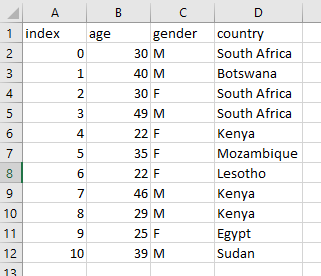
The first thing we wanted to do was get some statistics on the age column, like the minimum, maximum, average, and standard deviation metrics.
Now there are two ways of doing this. The better approach is just to import this excel file into Python and then find the metrics. The second way and longer way is to input the data ourselves. We will be doing the latter in order to understand the Python principles of variables and data types.
Just like in excel where we are storing numbers in cells we can also store numbers in Python as variables. So for example we have at cell B2 is equal to 30, cell B3 is equal to 40, and so on. Run the code below:
# Storing Data
B1 = 30
B2 = 40
B3 = 30
B4 = 49
print(B1)
print(B2)
Try storing the rest of the variables that we got from the excel dataset in column B and print them out too.
Now to store each value in a separate variable is a tedious process especially if we want to get some statistics from it. So let us rather use a variable that can store multiple values. There are many of these in Python, for now we are going to use one called a list. And a list is defined by square [] brackets with the values inside the square brackets separated by commas. We can also give a list a unique name. Let us call it age to match the excel column B dataset and do it as follows:
# Using Lists
age = [30,40,30,49,22,35,22,46,29,25,39]
print(age)
# Lists indexes start at 0 which has the value of 30
print(age[0])
print(age[1])
print(age[10])
# This will give an error as there is no value at index 11
print(age[11])
This looks a lot better. We can store all those values of age in a list data type called age:
age = [30,40,30,49,22,35,22,46,29,25,39]
Take note that to access any of the values all we need to do is use age[index]. Where index refers to the location in the list datatype. Note, the first value is stored at index 0 not 1. The second value is stored at index 1 and so on. The last value is stored at index 10:

If you try to access the index at 11 you will get the error list index out of range. See the excel data set again and look at column A called index to see how the values are stored.
Now we use some built in Python functions to get the same statistics we got in excel as shown below. Run the code below:
# Basic Stats
age = [30,40,30,49,22,35,22,46,29,25,39]
print(min(age))
print(max(age))
print(len(age))
print(sum(age))
average = sum(age)/len(age)
print(average)
So the cool thing is we can use the built in functions min, max, len, and sum to get the minimum and maximum number, the length of the list, and the sum of all the numbers. Thereafter, we can easily get the average. We will look at more of a manual approach later instead of using these functions. However, you will need to learn a little more do that. We will look at getting standard deviation a little later as well.
Let us now record all the information in other columns in lists too. So in the excel data set we have column C that holds Gender values for M (male) and F (female). Like before we can store the variables individually based on the cells. Run the code below:
# Storing Text
C2 = M
C3 = M
C4 = F
But wait! Its giving us an error name 'M' is not defined Why is that? Any letters, words, group of words fall under the category of a string data type. Therefore we need to add " to the beginning and end. Run the code below:
# Storing Text
C2 = "M"
C3 = "M"
C4 = "F"
print(C2)
print(C3)
print(C4)
Again this is a tedious task so let us create a list for gender:
gender = ["M","M","F","M","F","F","F","M","M","F","M"]
Run the code below:
# Storing Text
gender = ["M","M","F","M","F","F","F","M","M","F","M"]
print(gender[0])
print(gender[1])
print(gender[2])
print(gender[-1])
This is the same as before. we can access individual values starting with index = 0 for the first value. A nice feature of Python is that you can access the last value in the list by setting the index = -1.
Lastly, we can do the same for the country column and just make a list. Note, country values are strings as its words or groups of words:
country = ["South Africa","Botswana","South Africa","South Africa","Kenya","Mozambique","Lesotho","Kenya","Kenya","Egypt","Sudan"]
Run the code below:
# Storing Country Values
country = ["South Africa","Botswana","South Africa","South Africa","Kenya","Mozambique","Lesotho","Kenya","Kenya","Egypt","Sudan"]
print(country)
print(country[0])
print(country[5])
Find the minimum and maxiumum for the country list based on the number of characters:
country = ["South Africa","Botswana","South Africa","South Africa","Kenya","Mozambique","Lesotho","Kenya","Kenya","Egypt","Sudan"]
print(min(country,key=len))
print(max(country,key=len))
Extra
If you want to see all the general built-in functions try out the following code:
# Shows all the names of built-in functions
import builtins
print(dir(builtins))

import types
builtin_function_names = [name for name, obj in vars(builtins).items()
                          if isinstance(obj, types.BuiltinFunctionType)]
print(builtin_function_names)
If you want to know about all the built-in functions for a data type you can do the following:
# Shows all the built-in functions for a list:
dir(country)
Summary
This brings us to the end of the second lesson where we covered variables and data types. In the next lesson we will be lists and dictionaries.