Interactive Area
Any code that is shown can be run here. Simply copy and paste it below and run it:
Conditional Statements & Loops
Note, for this section onwards it is better to use a Python text editor, check out Appendix A for more details, https://github.com/kode2go/python/wiki/A.-Creating-and-Running-Python-Files
Remember in the beginning we output the following from our excel data set:
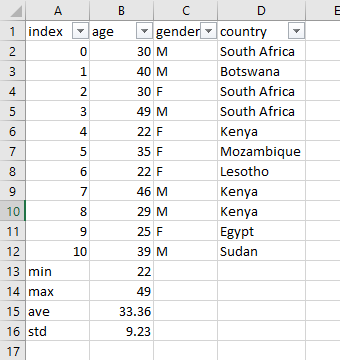
For example we only want to see people above the age of 30, who are male and are from South Africa. This is quite straight forward to do in excel by using the filter tab for example:
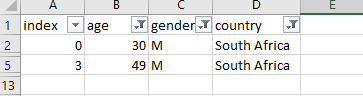
Let us start to do similar things in Python!
Loop through lists
We first need to know how to loop through a list. Why do we need to use loops? It helps us process data quicker. If you look at the index column in the excel data set let us say we want to create a similar list. We can do it like the following:
index = [0,1,2,3,4,5,6,7,8,9,10]
or using append we first need to create an empty list using []:
index = []
index.append(0)
index.append(1)
index.append(2)
index.append(3)
But that is a bit of a long process to type it all out if its a known sequence of numbers. Imagine we had 1000 values that we had to type out!!! There is where loops make our life a lot easier. We can do the same thing just with a few lines of code:
for i in range(11):
    index.append(i)
print(index)
With just 2 lines of code we can achieve the same thing! Note, this was written in a Python file. When we run it we get the following in the terminal:
Terminal Output:
[0, 1, 2, 3, 4, 5, 6, 7, 8, 9, 10]
This is called a for loop, the other common type is called a while loop. The for loop is structured as follows:
- You need to begin with the word
for - A space and then an incrementing variable like
i - Then a space and then the built in
rangefunction that controls how many times the loop will run, in this case 10. It will stop the loop at 11. - Thereafter you need a colon
:and then pressEnterto go to the next line - If you are using a text editor that recognizes Python you should see the next line indented usually by 4 spaces. If not, then you must manually add those spaces. This is a very important as this allows Python to know you are running local code specific to the for loop only.
- So the loop now increments the variable i from 0 to 10. Through each iteration it stores the new value
iinto theindexlist
Looping through existing lists
Well that was quite useful. But now we need to loop through lists that already exist. So for example if we have the age list, let us loop through that.
for index in range(len(age)):
    print(age[index])
So we are now using the same format as the for loop previously just with a few changes. We want to loop through the age list so our range must equate to the length or size of the age list. That is why we use the built in function len to get length of the list. Then we now it will loop through or iterate the correct number of values in the age list. So index variable counter will increment from 0 to the length of age which is 11. So what will the iteration function do. Well at each iteration it will execute the print function of the values found in the age list. So the first iteration will be print(age[0]), then the second print(age[1]), and so on.
In the previous lesson we looked at a grouped list. To be able to access all these values we will need to use something called a nested for loop, or a for loop within a for loop. Run the code and try to make sense what is going on:
index=[0, 1, 2, 3, 4, 5, 6, 7, 8, 9, 10]
age=[39, 25, 29, 46, 22, 35, 22, 49, 30, 40, 30]
gender = ["M","M","F","M","F","F","F","M","M","F","M"]
country = ["South Africa","Botswana","South Africa","South Africa","Kenya","Mozambique","Lesotho","Kenya","Kenya","Egypt","Sudan"]

group_list = [index,age,gender,country]

for mylist in range(len(group_list)):
    for value in range(len(group_list[mylist])):
        print(group_list[mylist][value])
Conditional Statements
Now what happens if we want to view only ages above 40 for example? Well then we need to use something called conditional statements using logical conditions!
All programming languages support logical conditions and Python is no different. For example here are a few:
| Logical Conditions | Example |
|---|---|
| Equals | a == b |
| Not Equals | a != b |
| Less Than | a < b |
| Less than or equal to | a <= b |
| Greater than | a > b |
| Greater than or equal to | a >= b |
These conditions we typically use with conditional statements or if statements and loops. And the output of these conditions are either True or False.
Let us take some simple examples. In our excel data set let use compare a few numbers. Our first value in our age list is 30, let us check now if it is equal to the third value in the age list being 30.
if 30 == 30:
    print("The condition is True")
    print("These numbers are the same")
else:
    print("The condition is False")
    print("These numbers are not the same")
Well we now 30 is equal to 30 so the condition must True as shown when you run this code.
So how are conditional statements structured. Well similar to a for loop this is a unique block of code:
- You must start with
ifstatement and then a ` ` space - Then state the condition like
30 == 30then a colon:. The double equals==just meansis it equal to. - Then press enter to go to a new line and you should indent with 4 spaces indicating this is a local block of code.
- Enter the first the and second
printstatements as shown. The program will only execute theseprintstatements if the condition isTrue. - Just in case it is not
True, i.eFalsewe will use theelsestatement. To do this, go to a new line by pressing enter, and make sure it is inline with theifstatement. Type outelseand then the colon:and then press enter to go to a new line that is indented with 4 spaces. - Enter the
printstatements as shown. The program will only execute theseprintstatements if the condition isFalse.
Now what happens if you change the condition from 30 == 30 to 30 == 40? Try it and see. The second print statement should be printed and not
the first as the condition is now False. Now let us add another condition to gain more insight. Let us check if the two numbers are not equal, maybe the one is less than the other?
if 30 == 40:
    print("The condition is True)
    print("These numbers are the same")
elif 30 < 40:
    print("The first number is smaller than the second number")
else:
    print("The condition is False")
    print("These numbers are not the same")
Now we added a new condition using the elif statement and you saw the elif print statement was executed and not the others. If any conditional statement is found to be True it will only execute that one and ignore the rest. This allows you to add many more conditions. However, the first condition must start with if and then you can add many elif statements, and then the final condition if any are false must be else. Note, else is not actually required but a good practice to use.
Now let us do something more practical. Let us check how many people are above the age of 35 in the age list by doing the following:
for index in range(len(age)):
    if age[index] > 35:
        print(age[index])
You should see you get the following:
39,46,49,40
More Examples of conditional statements. Run the code below and see what happens.
current_year = 2021
year = 2020
if year < current_year:
print("year is less than current_year")
You will get the following error as an output:
File "<stdin>", line 2
    print("year is less than current_year")
    ^
IndentationError: expected an indented block
An error occurred as there were no spaces before the print statement. This is important to take note of. Most programming languages use some type of brackets to group a portion or block of code together that has various layers. Now Python uses spaces to group blocks of code. Usually the text editors that recognize a Python file will do add the indented spaces for you once it notices you are doing a for loop or if statement.
This is the correct approach:
if year < current_year:
    print("year is less than current_year")
While Loop
Lastly, we will look at while loops. They are quite similar to for loops as you will see below. Let us do the same examples we did with index.
index = 0
while index < 11:
    print(index)
    index = index + 1
So the main difference is that we first have to state what our counting variable index is equal to in the beginning. So the first line says it is equal to 0. Then we start the while loop with the while condition and the a space. Then we need to define the condition while the while loop is true and that is index < 11 and add a colon :. So it will continue iterating the while loop until the condition index < 11 becomes false. Now we again go to a new line and it should be indented. Then we use the print statement telling us what the value of index is while it iterates in the while loop. And then very importantly we need to increment the index variable by saying index = index + 1. So for index variable will have the following values as it goes through the while loop:
index = 0
index = 1
index = 2
…
until index = 11 then it will exit the from the while loop. If you do not have the index = index + 1 line your while loop will go on forever or just crash your programme!
Great. That is all you need to know for now.
Exercise
One of the outputs we showed was the standard deviation of the age list from the excel data set. Now we can do this in Python too quite easily with a built-in function but for the purposes of learning we are going to do a manual approach since we learnt all the tools needed now to do it.
To work out the population standard deviation we need to do the following:
- Calculate the mean (average) of each data set.
- Subtract the deviance of each piece of data by subtracting the mean from each number.
- Square each deviation.
- Add all the squared deviations.
- Divide the value obtained in step four by the number of items in the data set.
- Calculate the square root of the value obtained in step five.
We have partially done this before. Let us complete the entire process:
Step 1. Given the age list we first need to find the mean of the list:
age=[39, 25, 29, 46, 22, 35, 22, 49, 30, 40, 30]

mean = sum(age)/len(age)

print(mean)
Step 2. Now we need to subtract the mean from value in the list and square the result:
We are first going to create an empty list that will store the squared differences called sq_diff_list and
then we are going to create a for loop to run through each value in the age list, subtract the mean, square the result and store in
the sq_diff_list variable:
# Create empty list
sq_diff_list = []

# Setup for loop
for i in range(len(age)):

    # Take average from each value in age list and square outcome. Note we square use double asterisks
    # sq_diff we are just using as a temporary variable to store the result
    sq_diff = (age[i] - mean)**2

    # add the results to the `sq_diff_list` list
    sq_diff_list.append(sq_diff)

    # print the result
    print(sq_diff)
Now we need to work out the mean of the sq_diff_list and square the result:
mean_sq_diff = sum(sq_diff_list)/len(sq_diff_list)
print(mean_sq_diff**0.5)
This process was quite tedious and in practice you would not do this as there is a built-in Python function to do it as shown below:
import numpy
age=[39, 25, 29, 46, 22, 35, 22, 49, 30, 40, 30]
print(numpy.std(age))