Python Functions & Modules
Up to now we have covered the basic principles of Python programming. The next few topics are supplementary topics that will help you program more efficiently and effectively. Now we haven’t really been able to re-use the code. That is where this section comes in. We will focus on three ways that code is reused. The first is using functions, the second is using a Python file, and the third is a module. Method two and three are somewhat related. Functions
A function is a block of code which only runs when it is called. You can pass it data, it performs certain tasks, and the returns a result. We have been using functions since we began this course. These are some of the functions you have already used:
• print()
• len()
• type()
You can always recognise a function as it has a () at the end of the word!
Let us create our own function. If we were to add two numbers and print the result, we would do it in the following way:
num1 = 40
num2 = 2
sum = num1 + num2
print(sum)
But now if we want to do another sum with maybe different numbers we have to write out these 4 lines of code again. Whereas with a function we create a template of what these 4 lines do and makes it generic. Then to use it, we call the function with just need 1 line of code that contains the 2 numbers we want to add, and the function will return the result. How do we do this:
def my_function_sum(number1, number2):
  sum_var = number1 + number2
  print(sum_var)

print(my_function_sum(40,2))
Now, if we have a lot more functions and code that we want to re-use we can put that a separate Python file.
Now let us do a more involved example. Let us create a simple addition calculator.
We first create a file called my_calc.py and add the following code:
print("Simple Addition Calculator")
print("Enter your first number: ")
num1 = input()
print("Enter your second number: ")
num2 = input()
sum = float(num1) + float(num2)
print("The answer to: " + str(num1) + " + " + str(num2) + " is: " +str(sum))
Now if we run the Python file the command line will ask for inputs that we will need to type out:
Simple Addition Calculator
Enter your first number:
40
Enter your second number:
2
The answer to: 40 + 2 is: 42.0
We can take this even further. Let us create two python files, where the one file calls or uses functions in the other.
We first create two files, one called my_sum_module.py and the other called my_main_program.py
In the editor, add the following code for each file: my_sum_module.py:
# This function adds two numbers together

def sum_func():
    print("Simple Addition Calculator")
    print("Enter your first number: ")
    num1 = input()
    print("Enter your second number: ")
    num2 = input()
    sum = float(num1) + float(num2)
    print("The answer to: " + str(num1) + " + " + str(num2) + " is: " +str(sum))
my_main_file.py:
import my_sum_module

print("Start Program")

my_sum_module.sum_func()
Now run the my_main_file.py
Start Program
Simple Addition Calculator
Enter your first number:
10
Enter your second number:
2
The answer to: 10 + 2 is: 12.0
So what happened was that Python ran the file called my_main_file.py and it first imported the my_sum_module, it then printed out Start Program and then it executed the function sum_func that is within my_sum_module.
In summary a module is just a function or group of functions that you can use within your main programme.
A library or packaged is a group of modules.
Common libraries or packages are Pandas, Numpy, and Matplotlib. They all have many Python files or modules with functions in them that you can use within your own programme.
If you have understood this, then you have understood the basic architecture of most Python programs.
Plotting
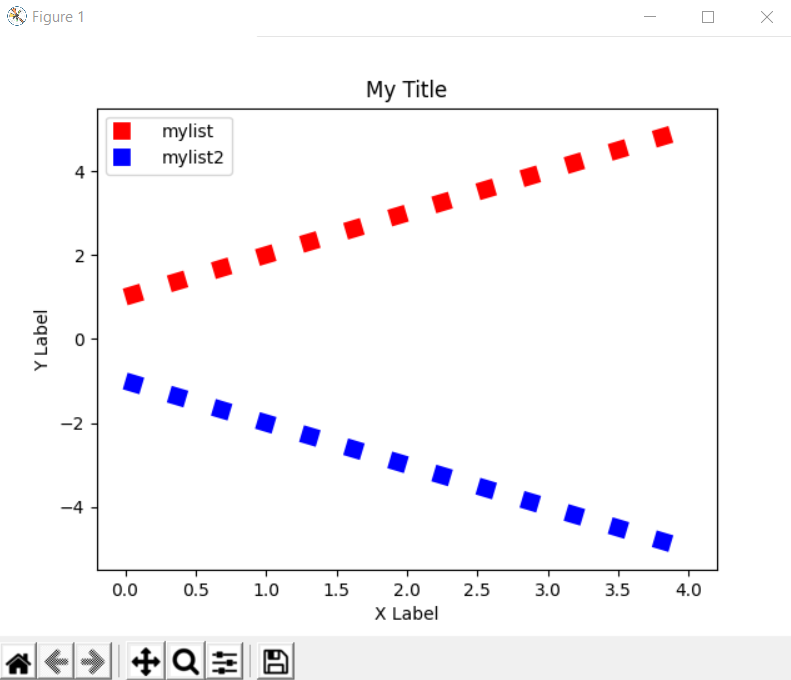
One of the most use Python package is matplotlib. Run the code below in your own machine and check you get the same output as shown below. We will cover the inner details of plotting in a later lesson.
import matplotlib.pyplot as plt

mylist = [1,2,3,4,5]
mylist2 = [-1,-2,-3,-4,-5]

plt.plot(mylist , ls= 'dotted', color = 'r',linewidth = '10')
plt.plot(mylist2 , ls= 'dotted', color = 'b',linewidth = '10')

plt.xlabel("X Label")
plt.ylabel("Y Label")
plt.title("My Title")
plt.legend(['mylist','mylist2'])

plt.show()