- Introduction
- What is programming?
- Python Overview
- Python as a tool for data Science
- Let’s get started
- Python Print and Input Functions
- Python Interpreter
- Good Programming Habits With Comments
- Summary
- Extra Resources:
Introduction
Welcome to this Python programming tutorial. In this tutorial we will be focusing on an introduction to Python programming. We assume that you have no background in Python programming so this course will cover the fundamental principles.
Note The first few pages is a tutorial on using python for the first time.
Note this code was developed in the following environment:
- OS: Windows 10,
- Python Version: 3.8.5
- IDE: CoCalc & Sublime 3.2.2
What is programming?
Programming is just a process of using instructions that tells a computer how to perform a task. We use the programming language of Python to create these instructions. Other programming languages also exist like C, C++, and Java. We will be using Python as it is quite versatile, easy to use, and quick to learn.
Python Overview
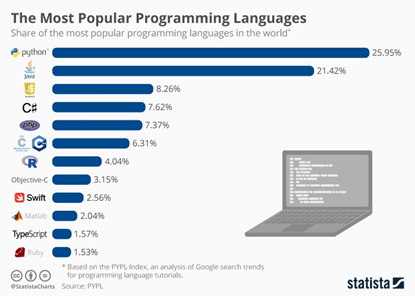
Python can be used to create pretty much any type of application, from data processing to web applications to running embedded systems. Like a Swiss Army Knife, Python may not be the best language for every specific application, but there’s a good chance it’s the second-best language for almost anything.
What can you do with it:
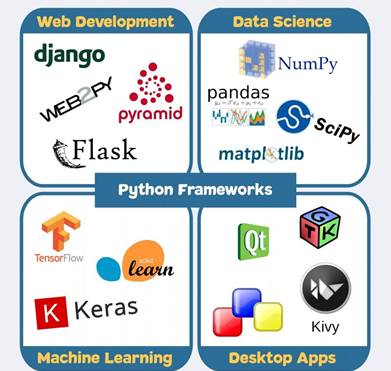
How does it compare to other programming languages (2019):
Python as a tool for data Science
Let us start with an example of data you have loaded in excel as shown below:
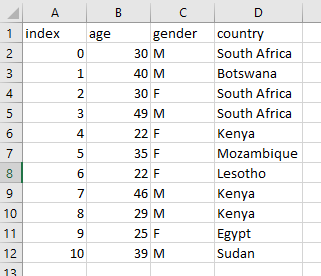
This is quite a simple data set that has age, gender, and country for 11 people. Imagine we want to extract some useful information from this table of data. Maybe let us also get some statistics on the age column, like the minimum, maximum, average, and standard deviation metrics:
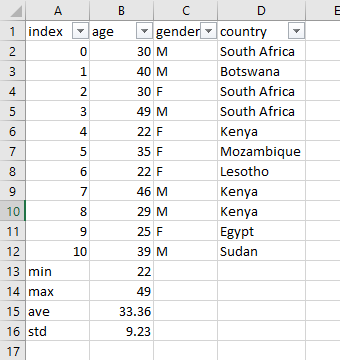
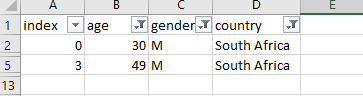
For example we only want to see people above the age of 30, who are male and are from South Africa. This is quite straight forward to do in excel by using the filter tab for example:
Finally, let us draw a graph of age distribution:
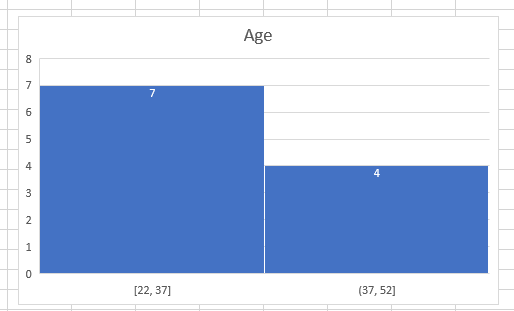
So these were simple tasks that were performed on this dataset and could be similar to what you would have to do. Now we will be using Python to do the exact same thing…and more! Python is just another tool that you can use to analyse and process your data. So you will be learning the necessary tools to be able to achieve what we did in excel.
Let’s get started
So firstly we need to setup the Python environment we going to use to analyse this simple dataset. We will be using https://trinket.io/features/python3 so you can practice and learn in the browser itself while learning. Using Chrome is preferred.
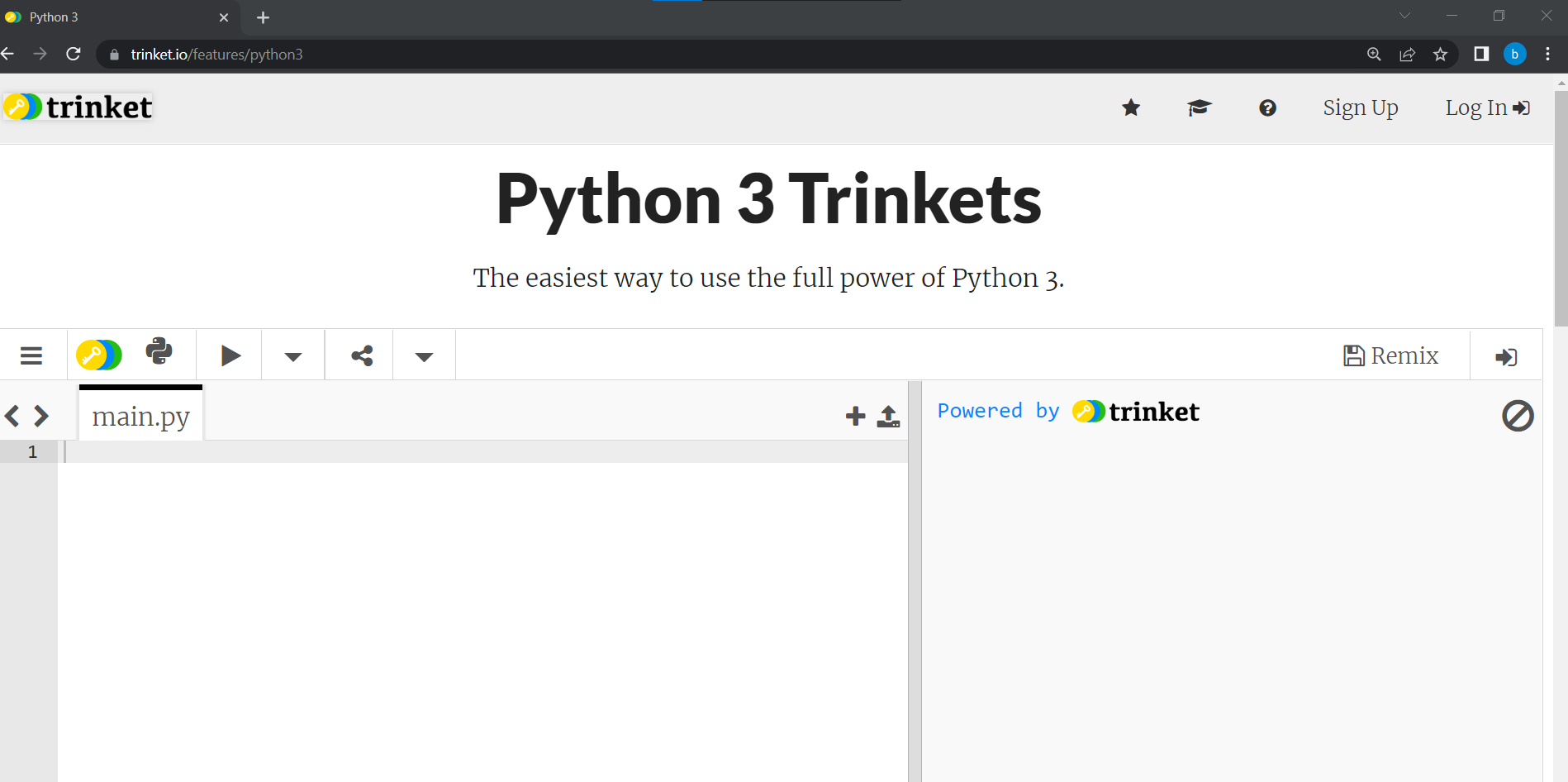
On the left-hand side you will write code and run it, then on the right-hand side you will see the output in the console area. During this course you will be asked to Run the code by clicking the on the Run arrow above the main.py file name. You will also be asked to input your own code and run it. Chrome is suggested to use, although other browsers work too. Firefox requires yout to first click on somewhere outside the interactive window before you click on Run. There are also many other ways to write Python code. I suggest something like VS Code at a later stage once you are more comfortable with Python.
Simple Math Examples:
Let us start off with some simple math commands. Note the Python convention for math operations below.
| Math Operator | Example |
|---|---|
| Addition | 10 + 20 |
| Subtraction | 10 - 20 |
| Multiplication | 10*20 |
| Division | 10/20 |
| Power | 10**2 |
| Assignment | x = 5 |
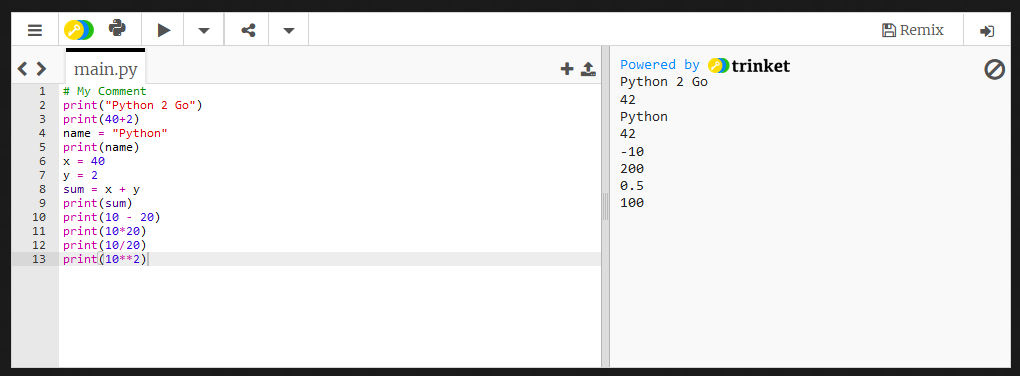
See the interactive Python environment below where we have performed a few simple commands like using the print function to display something to the console, storing variables, and doing simple sums:
Go ahead, and click on the play arrow to run the main.py script so you will see the output of the code in the console area.
Before we explain what the code does, try it out yourself. Add your own code at line 10 and below that will display the answer to the following:
print(10 - 20)
print(10*20)
print(10/20)
print(10**2)
You should have gotten the following:
Let us take a step back and go through what we have done so far.
First off, we did some basic math by adding two numbers. These types of numbers are also known as integers. You should have seen the answer as 42 which is an integer. We can also print or display that answer as text, with print(40+2). We also made a variable called name which stores the text ` “Python” . Note the two exclamation marks “ ”, makes sure the variable is stored as text, again also known as a string.
We then started assigning some variables like x = 40 and y = 2. We can print out what those variables represent at any time if you just enter print(x) and print(y). Then we made a sum as sum = x + y which we then printed out on the terminal using the print function: print(sum)`.
Python Print and Input Functions
We can do many things with the print() function, more than we have done so far. We can print multiple lines of text using \n and shapes as well. Run the code below to see what happens:
We have seen now a few examples of how to output variables, values and text using the print() function. We can also do get data input as well using the input() function. Run the code below to see what happens:
Python Interpreter
Note that Python reads your code sequentially from top to bottom. For example this works:
1. mysum= 40 + 2
2. print(mysum)
Python reads each line in order. However, this will not work as an error will show up:
1. print(mysum)
Traceback (most recent call last):
  File "<stdin>", line 1, in <module>
NameError: name 'mysum' is not defined
Since there is no variable that was declared before called mysum. You must declare or define it before you use it.
Well done! That’s it! You have been doing basic Python programming.
Good Programming Habits With Comments
- Add comments to each line of code explaining what it does. Also, any time you code a variable it is stored in memory. It is a good practice for beginners to write that out as a comment the line of code that declared the variable.
1.
2. mysum= 40 + 2
3. #store the sum of two values (40 and 2) in the variable called mysum, in memory mysum = 42
4. print(mysum)
This is more applicable for larger programs as you will see later.
Summary
This is the end of this lesson on getting an overview of Python and how to set it up. In the next lesson we will be focusing on working through the excel data set!
Extra Resources:
General Python Resources:
- https://www.python.org/
- https://www.w3schools.com/python/default.asp
- https://automatetheboringstuff.com/
- https://realpython.com/
Data Science:
- https://www.datacamp.com/courses/intro-to-python-for-data-science
- https://realpython.com/tutorials/data-science/
- https://towardsdatascience.com/tagged/python
Machine Learning:
- https://www.tensorflow.org/
- https://keras.io/
- https://scikit-learn.org/stable/
GUI Applications:
- https://wiki.python.org/moin/TkInter (This is where everyone starts)
- https://www.tutorialspoint.com/python/python_gui_programming.htm
- https://realpython.com/python-gui-tkinter/
- https://www.tutorialspoint.com/pyqt/pyqt_hello_world.htm
Web Development:
- https://www.djangoproject.com/
- https://flask.palletsprojects.com/en/1.1.x/
Mobile App Development
- https://kivy.org/#home
Other
- http://ode.org/ (simulating rigid body dynamics, pendulums, collision dynamics)
- https://micropython.org/ (micro-electronics, IoT)
- https://opencv.org/ (Image Processing, Computer Vision)