Interactive Area
Any code that is shown can be run here. Simply copy and paste it below and run it:
Data Storage With Lists
Lists have many features. We will be covering some of them in this lesson.
A list can also contain all kinds of data types:
# Data Storage With Lists
my_list = [42, -2021, 6.283,"tau", "node"]
print(my_list)
We can do many things with lists:
- print all the items in the
listusing[:] - we can add items to the end of the
listusingappend() - add items at specific positions using
insert() - remove an item from the
listusing theremove()function - check how many variables are in the
listusing the len() - print a range of values using
[start:end]– just like in excel!
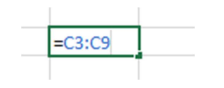
Let us see some examples of this. Run the code below:
# Data Storage With Lists
my_list = [42, -2021, 6.283,"tau", "node"]
print(my_list)

print(my_list[:])
my_list.append("pi")
print(my_list)
my_list.insert(1,"pi2")
print(my_list)
my_list.remove("pi")
my_list.remove("pi2")
my_list.remove("tau")
print(my_list)
print(len(my_list))
# View a certain range of items:
print(my_list[0:3])
When we are getting only a certain range of values from a list we call this list slicing. We can do a lot of cool things with lists like sorting, and joining. Please note, like with any tool, this data type has its limitations. You will learn over time to use the best data type for the right task.
Storing Data Into Lists From Excel
Now we will be continuing with the excel dataset that we used in the previous lessons:
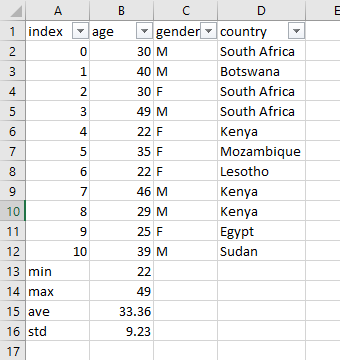
For now, we will be focusing on more features regarding the list data type as it will teach you the most important principles about storing multiple variables. A few more built in functions of lists are shown below. The first being count which count how many times that value is in the list:
# Data Storage With Lists
age = [30,40,30,49,22,35,22,46,29,25,39]
print(age)

print(age.count(49))
print(age.count(2))
print(age.count(30))
Exercise: Using the
countfunction check how many times the number 22 is in the age list
We can also reverse the items in a list, copy a list, and add lists together as shown below:
# Data Storage With Lists
age = [30,40,30,49,22,35,22,46,29,25,39]
print(age)

# reverse a list
age.reverse()
print("reversed list: ", age)
age.reverse()
# copy a list
age_new = age.copy()
print("copied list: ", age_new)
# clear a list
age_new.clear()
print("cleared list: ", age_new)
# add lists together
age_new = age.copy()
add_list = age + age_new
print("added lists: ", add_list)
Lastly, we can also sort values in a list
# Data Storage With Lists
age = [30,40,30,49,22,35,22,46,29,25,39]
print(age)

# Sort age in ascending order
age.sort()
print("sorted age (asc): ",age)
# Sort age in descending orde
age.sort(reverse=True)
print("sorted age (des): ",age)
Grouping Lists
As I mentioned before a list can contain various kinds of types, even a list itself. What you see below is we are storing the lists age, gender, and country inside group_lists:
# Grouped Lists
age = [30,40,30,49,22,35,22,46,29,25,39]
gender = ["M","M","F","M","F","F","F","M","M","F","M"]
country = ["South Africa","Botswana","South Africa","South Africa","Kenya","Mozambique","Lesotho","Kenya","Kenya","Egypt","Sudan"]

group_lists = [age,gender,country]
# Display all the lists
print("group lists: ",group_lists)
# Only show the first list
print("group lists[0]: ",group_lists[0])
# Only show the second list
print("group lists[1]: ",group_lists[1])
# Only show the third list
print("group lists[2]: ",group_lists[2])
# Only show the first value in the first list
print("group lists[0][0]: ",group_lists[0][0])
# Only show the second value in the first list
print("group lists[0][1]: ",group_lists[0][1])
# Only show the first value in the second list
print("group lists[1][0]: ",group_lists[1][0])
# Show all the values in the second list
print("group lists[1][:]: ",group_lists[1][:])
Exercise: From the variable
group_listsdisplay the last value in the third list.
Data Storage With Dictionaries
A useful data type is called a dictionary which we will only briefly cover. A dictionary is an
unordered data type that is structured using keys and values and is defined with curly
brackets {}. Where keys are like the column names and values are the lists of data. See the
example below by running the code:
# Dictionaries

age = [30,40,30,49,22,35,22,46,29,25,39]
gender = ["M","M","F","M","F","F","F","M","M","F","M"]
country = ["South Africa","Botswana","South Africa","South Africa","Kenya","Mozambique","Lesotho","Kenya","Kenya","Egypt","Sudan"]


dict_dataset = {'age': age,'gender': gender,'country':country}
print(dict_dataset.keys())
print(dict_dataset.values())
print(dict_dataset['age'][0])
Exercise: Can you print out all the values for gender?
This assigns a dictionary to the dataset variable. This dictionary’s keys are ‘age’, ‘gender’, and ‘country’. The values for these keys are several as you can see. You can access these values or keys as shown. Note, you can also created nested dictionaries. Instead of creating lists within the dictionary we could have created them as dictionaries. Note, we can also put dictionaries in lists as well!
Dictionary keys are unique. Unlike lists, items in dictionaries are unordered. There is no first or last item in a dictionary. While the order of items matters for determining whether two lists are the same, it does not matter in what order the key-value pairs are typed in a dictionary.
As you model more complicated things, you may find you need to either use dictionaries or lists or a combination of them. Lists are useful to contain an ordered series of values, and dictionaries are useful for associating keys with values. Because dictionaries are not ordered, they can’t be sliced like lists. Though dictionaries are not ordered, the fact that you can have arbitrary values for the keys allows you to organize your data in powerful ways.
Dictionaries vs. Lists
Dictionary keys are unique
Unlike lists, items in dictionaries are unordered. The first item in a list named spam would be spam[0]. But there is no “first” item in a dictionary. While the order of items matters for determining whether two lists are the same, it does not matter in what order the key-value pairs are typed in a dictionary. Enter the following into the interactive shell:
As you model more complicated things, you may find you need dictionaries and lists that contain other dictionaries and lists. Lists are useful to contain an ordered series of values, and dictionaries are useful for associating keys with values.
Because dictionaries are not ordered, they can’t be sliced like lists. Though dictionaries are not ordered, the fact that you can have arbitrary values for the keys allows you to organize your data in powerful ways.
Summary
This brings us to the end of the lesson. On to the next one.